Step-by-Step Guide for Creating a New User Activation Campaign
Updated Jun 17, 2025·1 min read
campaignnew user activation
- Go to the "Campaigns" Section:
- Open the "Marketplace" tab and select "Loyalty Program" > "Campaigns".
- Create a New Campaign:
- Click the "Add +" button.
- Enter Campaign Name:
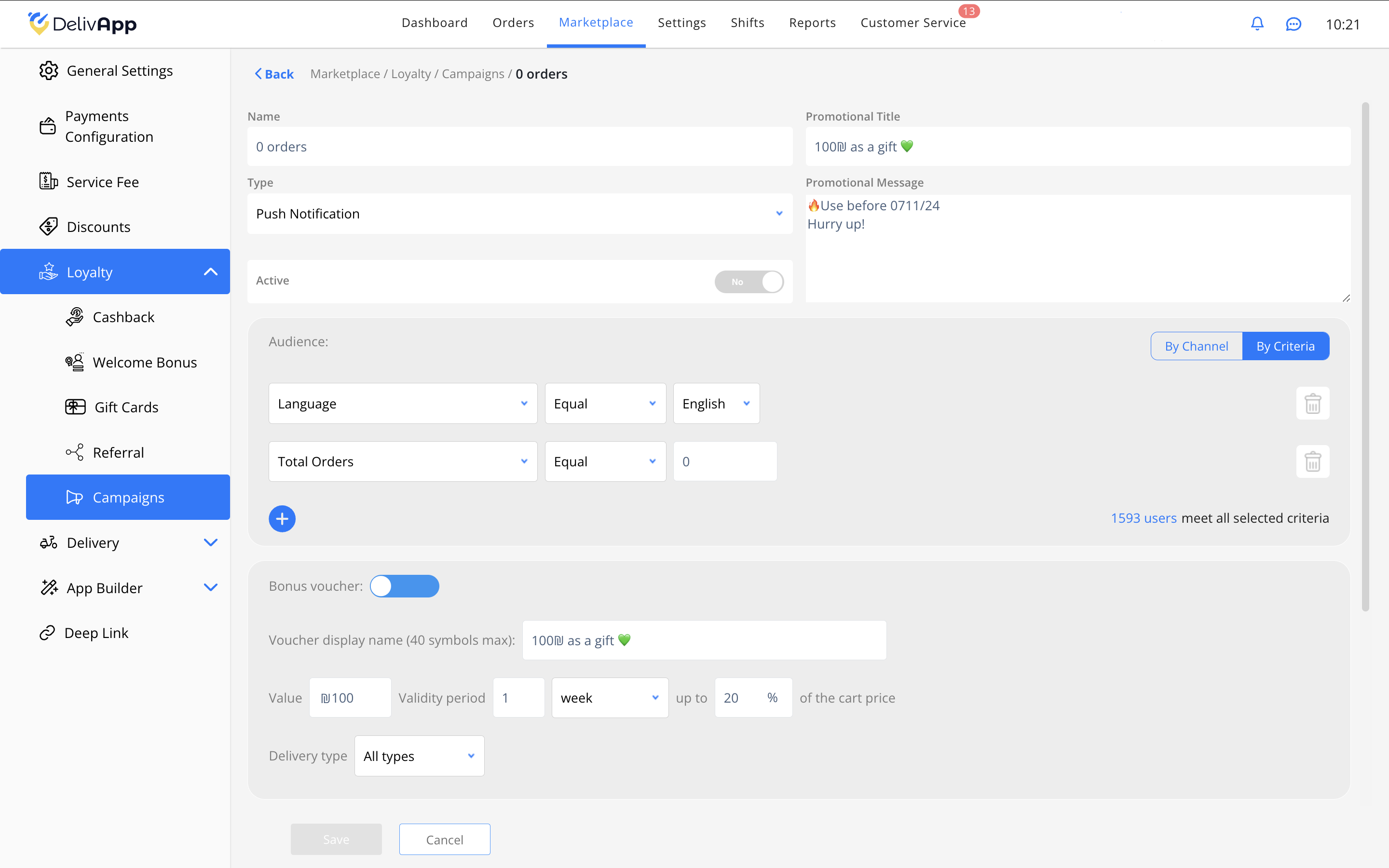
- Name the campaign, e.g., "0 orders".
- Select Campaign Type:
- Set "Push Notification".
- Define Audience:
- Add criteria such as "Total Number of Orders" = 0 to target new users.
- Add a Bonus Voucher:
- Activate the "Bonus Voucher" option and enter the amount, e.g., 100 ₪.
- Set Validity Period and Recurrence:
- Set the voucher validity and enable recurrence if needed.
- Save Settings.
Was this article helpful?